
Can you tell if a power strip is a surge protector just by looking at it? Not always. While some power strips offer surge protection, many do not. Distinguishing surge protectors from regular power strips requires a closer look at their features and specifications. This guide will help you identify a true surge protector, ensuring your valuable electronics are shielded from damaging power surges.
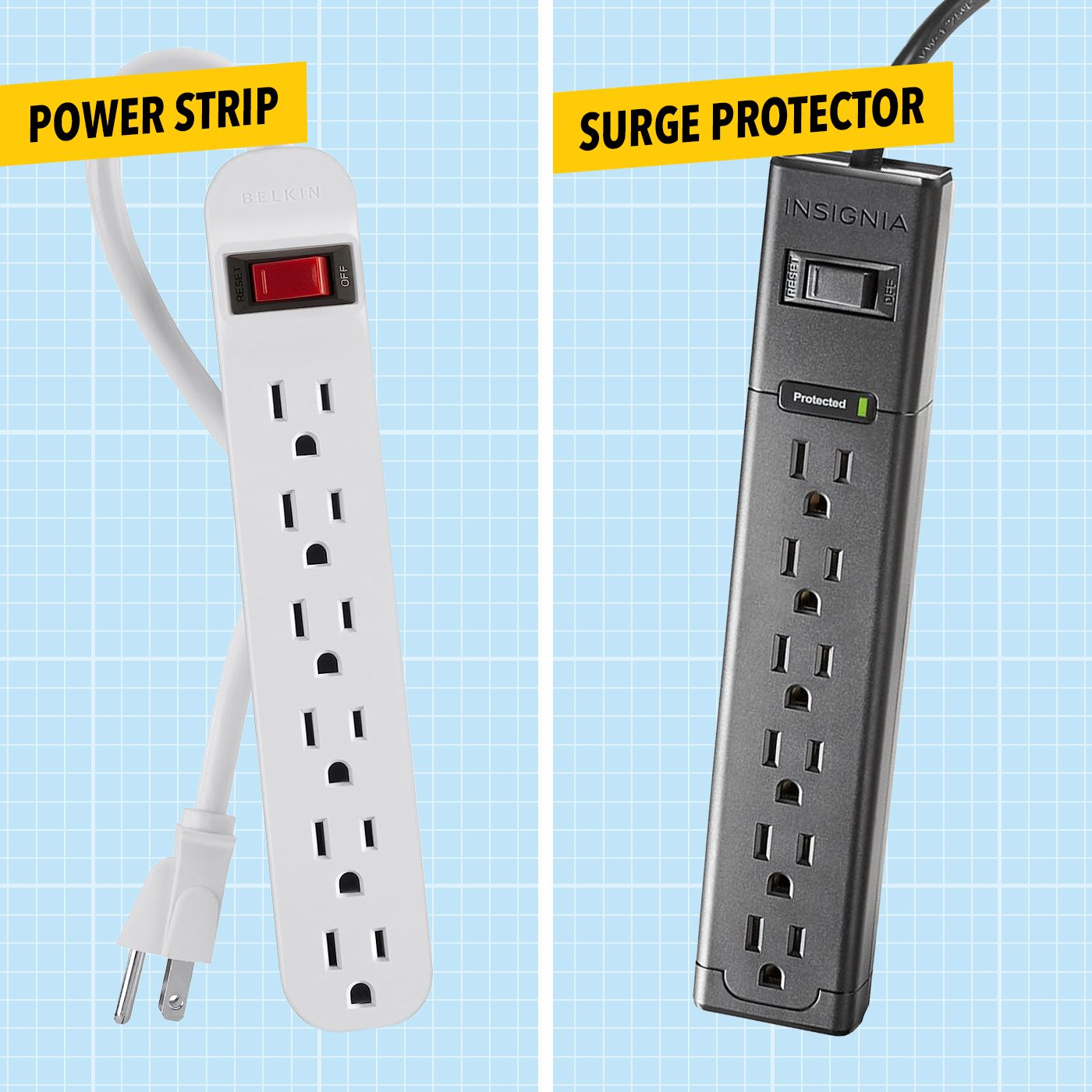
Image Source: www.familyhandyman.com
The Importance of Surge Protection
In today’s technologically driven world, we rely heavily on electronic devices for everything from work and communication to entertainment and home management. These devices, often sensitive and expensive, are vulnerable to sudden spikes in electrical voltage. These spikes, commonly known as power surges, can originate from various sources. Lightning strikes, even those far away, are a primary culprit, sending powerful electrical currents through power lines. More commonly, however, surges are caused by the on-and-off switching of high-power appliances within your home, such as refrigerators, air conditioners, or even electric dryers. These internal surges can be just as damaging, slowly degrading internal components over time or causing immediate failure.
This is where a surge protector becomes invaluable. Its core function is to divert excess voltage away from connected devices, safeguarding them from damage. A surge suppressor, a term often used interchangeably, acts as a protective barrier, absorbing or redirecting unwanted voltage. Without adequate surge protection, your computers, televisions, gaming consoles, and other electronics are constantly at risk, leading to costly repairs or premature replacement.
What is a Power Surge?
A power surge is a brief but significant increase in voltage above the standard electrical supply level. Think of it as a sudden, powerful wave of electricity. This wave can travel through your home’s wiring and into your electronic devices.
Common Causes of Power Surges:
- Lightning Strikes: Even if lightning doesn’t hit your house directly, it can strike nearby power lines and induce surges that travel through the electrical grid.
- Internal Electrical System Activity: Large appliances like refrigerators, air conditioners, washing machines, and dryers draw a lot of power when they start up or shut off. This sudden demand can cause voltage fluctuations and create smaller surges within your home’s wiring.
- Utility Company Operations: Sometimes, power grid maintenance or issues with equipment at the utility company can cause temporary voltage irregularities.
- Faulty Wiring: Damaged or old wiring in your home can also contribute to voltage instability and surges.
How Surge Protectors Work
At their heart, surge protectors utilize components designed to react to overvoltage. The most common component is a Metal Oxide Varistor (MOV). An MOV is a voltage-dependent resistor.
- Normal Voltage: Under normal voltage conditions, the MOV has very high resistance. This means it acts like an open switch, allowing electricity to flow uninterrupted to your connected devices.
- Overvoltage (Surge): When a voltage spike occurs, the MOV’s resistance drops dramatically. It becomes a low-resistance path, essentially creating a short circuit for the excess voltage. This excess voltage is then diverted away from your electronics and safely shunted to the ground wire.
A power strip with surge protection is essentially a power strip that has these MOVs or similar protective components built into its circuitry.
Identifying a True Surge Protector
Now, let’s get to the critical question: how do you tell if a power strip is actually a surge protector? It’s not always obvious, but there are key indicators to look for.
1. Packaging and Product Description
The most straightforward way to identify a surge protector is by its packaging or the product description if you’re buying online. Reputable manufacturers will clearly label their surge protectors.
Look for keywords like:
- Surge Protector
- Surge Suppressor
- Surge Protection
- Joule Rating
- Voltage Protection
If a power strip simply says “power strip” or “extension cord,” it likely lacks surge protection.
2. The Joule Rating: A Key Indicator
One of the most important specifications for a surge protector is its Joule rating. This number tells you how much energy the surge protector can absorb before it fails. A higher Joule rating generally indicates better surge protection and a longer lifespan for the device.
- What is a Joule? A Joule is a unit of energy. In the context of surge protection, it represents the amount of energy the surge suppressor can absorb without damage.
- What to Look For: A power strip with a Joule rating is almost certainly a surge protector. Typical ratings can range from 300 Joules to over 2000 Joules.
- Low-end: 300-500 Joules might protect very basic devices, but is generally insufficient for modern electronics.
- Mid-range: 600-1000 Joules is suitable for standard electronics like lamps or chargers.
- High-end: 1000+ Joules is recommended for sensitive and expensive electronics such as computers, home theater systems, and gaming consoles.
Table: Typical Joule Ratings and Protection Levels
| Joule Rating | Protection Level | Recommended for |
|---|---|---|
| < 300 | Minimal protection; not recommended | Not recommended |
| 300 – 600 | Basic protection for low-power devices | Chargers, lamps, clocks |
| 600 – 1000 | Moderate protection for common electronics | TVs, desktop computers, routers |
| 1000 – 1800 | Good protection for sensitive electronics | Gaming consoles, home theater systems, laptops |
| 1800+ | High-level protection for most demanding equipment | Multiple high-end electronics, home entertainment centers |
Crucially, if a power strip has a Joule rating printed on it, you have identified a surge protector.
3. The Surge Protector Indicator Light
Many surge protectors feature an indicator light, often labeled “Protected,” “Surge Protection,” or similar. This light signifies that the surge protection functionality is active and working correctly.
- What it Means: When this light is on, it indicates that the internal surge protection components (like MOVs) are intact and capable of diverting excess voltage.
- What Happens When it Goes Out: Surge protection components degrade over time with each surge they absorb. Eventually, they fail. When the indicator light turns off, it means the surge protection has been exhausted, and the power strip is now just a regular power strip, offering no protection to your connected devices. This is a critical piece of information for surge protector identification.
4. UL Certification and Standards
Look for safety certifications from organizations like Underwriters Laboratories (UL). Specifically, for surge protectors, you’ll want to see UL 1449.
- UL 1449: This is the standard for Surge Protective Devices (SPDs). If a power strip is certified to UL 1449, it has met rigorous safety and performance requirements for surge protection.
- Other Standards: You might also see mentions of standards like ANSI/UL 1449, ETL, or CSA. These certifications indicate that the product has been tested and meets safety guidelines.
A power strip that meets UL 1449 standards is a legitimate surge protector.
5. Number of Outlets and Type of Protection
While not always a definitive giveaway, the design of a power strip can sometimes offer clues.
- More Outlets, More Protection: Often, surge protectors have more outlets than basic power strips, as they are designed to protect multiple devices.
- EMI/RFI Filtering: Many higher-quality surge protectors also include filters for Electromagnetic Interference (EMI) and Radio Frequency Interference (RFI). While not directly surge protection, these filters help ensure a cleaner power signal for your electronics, leading to better performance and longevity. This is another aspect of surge protector functionality.
6. Price Point
Generally, surge protectors are more expensive than basic power strips. This is due to the additional components and circuitry required for voltage protection. If a power strip seems unusually cheap, it’s more likely to be a simple power strip without surge protection.
What a Basic Power Strip Lacks
A basic power strip, also known as a multi-plug adapter or a cord extension, simply splits one outlet into multiple outlets. It does not offer any surge protection.
- No Joule Rating: You will never find a Joule rating on a basic power strip.
- No Indicator Lights: They lack the specific indicator lights associated with surge protection.
- No Specialized Components: They do not contain MOVs or other components designed to absorb voltage spikes.
Connecting sensitive electronics to a basic power strip is akin to leaving them exposed to the risks of power surges.
Why Distinguishing Surge Protectors is Crucial
The difference between a surge protector and a basic power strip can have significant financial and technical consequences.
- Protecting Your Investment: Modern electronics are expensive. A surge protector is a relatively inexpensive way to protect your investment in computers, home entertainment systems, and other valuable devices.
- Preventing Data Loss: A sudden power surge can corrupt data on your computer, leading to lost work or important files.
- Avoiding Costly Repairs: Replacing damaged electronics can be very expensive. Surge protection can prevent these costs.
- Ensuring Device Longevity: Even small, frequent surges can degrade electronic components over time, shortening the lifespan of your devices. Consistent surge protection helps your electronics last longer.
How to Perform Surge Protector Testing (and What it Means)
While you can’t typically “test” the surge protection capability in a do-it-yourself way in the sense of simulating a lightning strike, there are ways to check if your existing surge protector is still functioning correctly.
1. Checking the Indicator Light
As mentioned earlier, the “Protected” or “Surge Protection” indicator light is your primary visual cue.
- If the light is ON: Your surge protector is likely working as intended.
- If the light is OFF: The surge protection has been exhausted. The unit should be replaced immediately.
2. Testing Outlet Functionality
You can test if the power strip itself is still providing power.
- Plug in a known working device (like a lamp) into each outlet on the surge protector.
- If the device powers on, the outlets are functional. However, this does not confirm the surge protection is active.
3. Professional Surge Protector Testing
For businesses or those with highly critical equipment, professional surge protector testing services are available. These services use specialized equipment to simulate voltage surges and measure the response of the surge protector. This provides a definitive assessment of its protective capabilities. However, for most home users, relying on the indicator light and periodically replacing older units is sufficient.
What Happens When Surge Protection Fails?
When the surge protection components fail (indicated by the indicator light going out), the power strip continues to function as a basic power strip. It will still supply power to your connected devices, but it will no longer offer any voltage protection against surges. This is a dangerous situation, as you might believe your devices are protected when they are not.
Types of Surge Protectors
Not all surge protectors are created equal. They differ in their design, capacity, and features.
1. Power Strip Surge Protectors
These are the most common type, resembling regular power strips but with built-in surge protection. They offer multiple outlets and are generally cost-effective.
2. Wall Outlet Surge Protectors (Surge Strips)
These plug directly into a wall outlet and provide a few protected outlets. They are a good option for protecting individual devices or in situations where a full power strip is not needed.
3. Whole-House Surge Protectors
These are installed at the main electrical panel of your home by a qualified electrician. They provide a first line of defense against surges entering your home from the utility grid, protecting all circuits and devices connected to your home’s power. They are the most comprehensive form of surge protection.
4. Network and Data Line Surge Protectors
In addition to power surges, sensitive data lines (like Ethernet, coaxial cable, or phone lines) can also carry damaging voltage spikes. Specialized surge protectors exist to protect these connections, ensuring your modem, router, and network-connected devices are safe from surges entering through these pathways.
Key Features to Look For in a Surge Protector
When purchasing a new power strip with surge protection, consider these important features:
- Joule Rating: Aim for at least 1000 Joules for valuable electronics.
- Indicator Lights: Ensure it has a “Protected” or “Surge Protection” light.
- UL 1449 Certification: This is a crucial safety and performance standard.
- Clamping Voltage: This is the voltage level at which the surge protector begins to divert excess power. Lower clamping voltages are generally better (e.g., 300-400V).
- Response Time: How quickly the surge protector reacts to a surge. Faster is better (measured in nanoseconds).
- EMI/RFI Filtering: Helps ensure cleaner power for your devices.
- Warranty: Many reputable surge protectors come with equipment protection warranties, covering damage to connected devices if the surge protector fails.
How to Interpret Power Strip Ratings
Power strip ratings go beyond just the number of outlets. For surge protectors, the most vital ratings relate to their protective capabilities.
- Joule Rating: As discussed, this indicates the energy absorption capacity.
- Clamping Voltage (VC): This is the voltage at which the surge protector starts to divert electricity. A lower clamping voltage means the surge protector activates sooner, offering better protection. For example, a clamping voltage of 330V is better than 400V.
- Maximum Voltage (VM): This is the maximum voltage the surge protector can withstand.
- Response Time: Measured in nanoseconds (ns), this is how quickly the surge suppressor reacts to a surge. A faster response time (e.g., 1 ns) is preferable to a slower one (e.g., 25 ns).
Table: Key Surge Protector Ratings Explained
| Rating | Description | Importance |
|---|---|---|
| Joule Rating | Amount of energy the protector can absorb before failing. | Higher is better; indicates greater capacity and lifespan. |
| Clamping Voltage (VC) | The voltage at which the protector begins to divert surge current. | Lower is better; means protection starts sooner. |
| Maximum Voltage (VM) | The maximum voltage the protector can handle before failing. | Higher is generally better, but clamping voltage is more critical for active protection. |
| Response Time | How quickly the protector reacts to a voltage surge (measured in nanoseconds). | Faster is better; the quicker it acts, the less surge energy reaches the device. |
| UL 1449 | Safety certification standard for Surge Protective Devices. | Essential for ensuring the product is safe and performs as advertised. |
When to Replace Your Surge Protector
Surge protection components have a finite lifespan. They degrade with every surge they absorb.
- Indicator Light Off: This is the most direct sign that the surge protection is no longer active. Replace the unit immediately.
- Age: Even if the indicator light is on, it’s generally recommended to replace surge protectors every 3-5 years. Technology improves, and the components themselves age.
- Physical Damage: If the power strip is visibly damaged, cracked, or has any burnt smell, discard it immediately.
- After a Major Power Event: If you experience a significant power surge or a lightning strike near your home, it’s wise to replace your surge protector, even if the indicator light is still on, as it may have absorbed a substantial amount of energy.
Frequently Asked Questions (FAQ)
Q1: Can I use a regular power strip for my computer?
A: While a regular power strip will provide power to your computer, it offers no protection against power surges. For valuable electronics like computers, it is highly recommended to use a dedicated power strip with surge protection to prevent potential damage or data loss.
Q2: How do I know if my surge protector is working?
A: Most surge protectors have an indicator light, often labeled “Protected” or “Surge Protection.” If this light is on, the surge protection is active. If the light is off, the surge protection has been exhausted, and the unit should be replaced.
Q3: What is a good Joule rating for a surge protector?
A: For valuable and sensitive electronics like computers, TVs, and gaming consoles, a Joule rating of 1000 Joules or higher is recommended. Lower ratings may suffice for less critical devices, but higher is generally better.
Q4: Can I test my surge protector’s protection level?
A: You can check if the indicator light is on to confirm the protection is active. However, you cannot accurately “test” the actual surge protection capability without specialized equipment. It’s best to rely on the indicator light and replace the unit periodically (every 3-5 years) or if it shows signs of damage.
Q5: Are all power strips surge protectors?
A: No, absolutely not. Many power strips are just simple adapters that split one outlet into multiple, offering no protection against power surges. Always check the packaging or product specifications for explicit mentions of surge protection, Joule ratings, and indicator lights.
Q6: What is the difference between a surge protector and a voltage regulator?
A: A surge protector diverts excess voltage during a surge. A voltage regulator, on the other hand, actively maintains a consistent voltage output, smoothing out fluctuations (both highs and lows) to provide a stable power supply. Some advanced power protection devices may incorporate both features.
Q7: My surge protector has an indicator light that says “Grounded.” What does that mean?
A: The “Grounded” light indicates that the surge protector is properly connected to a grounded electrical outlet. Proper grounding is essential for the surge protector to effectively divert excess voltage to the ground, thus protecting your devices. If the grounded light is off, ensure the surge protector is plugged into a correctly wired outlet.
By familiarizing yourself with these indicators and specifications, you can confidently distinguish between a basic power strip and a true surge protector, ensuring your valuable electronics receive the protection they deserve.