
Can you plug a TV into any power strip? No, not all power strips offer the same level of protection. A surge protector safeguards your electronics from sudden voltage spikes, while a basic power strip simply provides more outlets. Identifying whether your power strip is a surge protector is crucial for device protection and overall electrical safety.
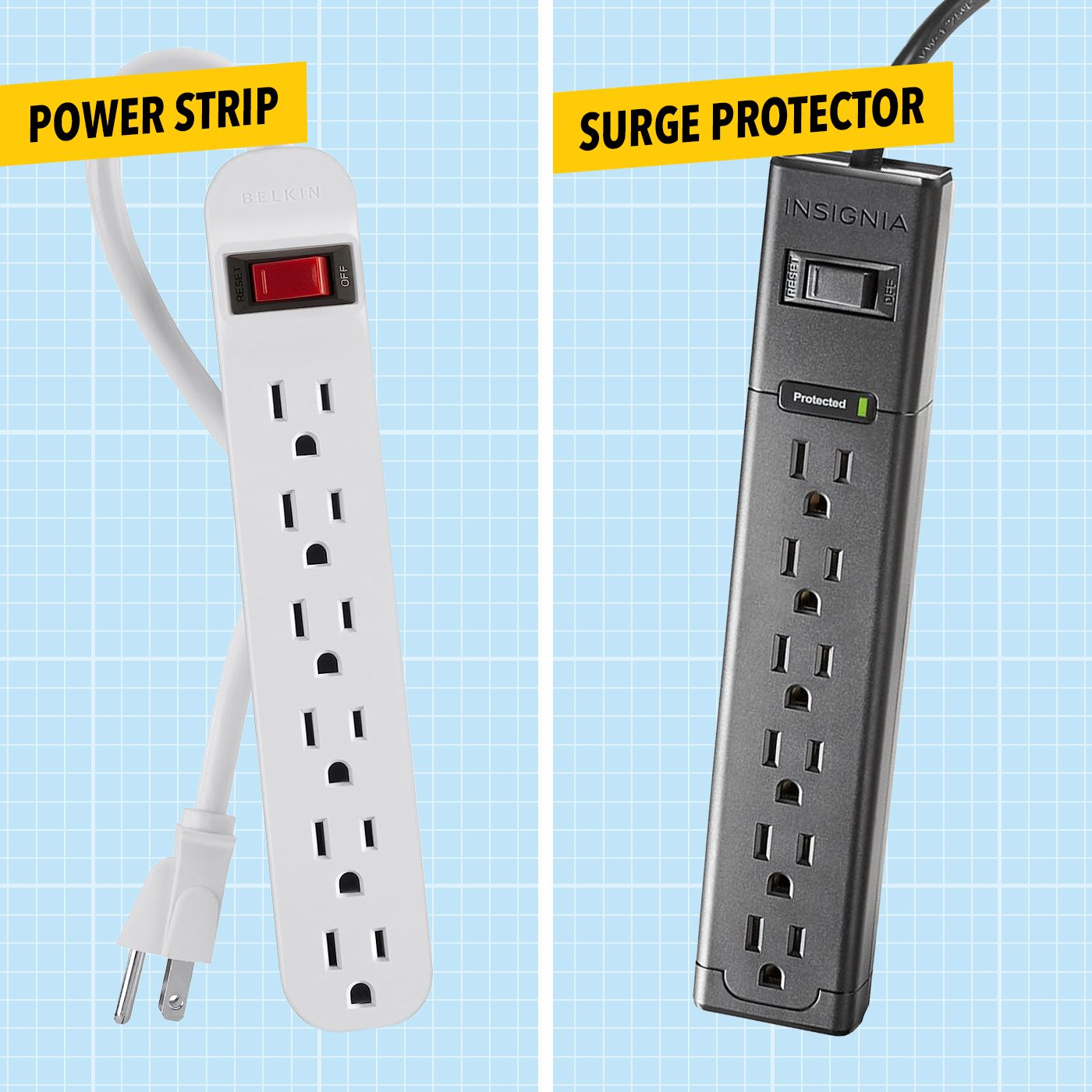
Image Source: www.familyhandyman.com
Decoding Power Strip Features
Many people wonder what makes a power strip a surge protector. It boils down to specialized internal components designed to absorb or divert excess electrical energy. A simple power strip is essentially a multi-outlet adapter, offering convenience but no defense against power surges. Surge protectors, on the other hand, are built with varistors or metal oxide varistors (MOVs) that act as a gatekeeper for electricity. When a voltage spike occurs, these components sacrifice themselves by diverting the excess energy to the ground wire, preventing it from reaching your sensitive electronics.
Key Indicators of Surge Protection
To accurately determine if your power strip offers surge protection, you need to look for specific features and markings. These clues are not always obvious, but a careful inspection can reveal the truth.
Examining the Packaging and Product Information
The most straightforward way to identify a surge protector is by checking its original packaging or the product’s documentation. Manufacturers are legally obligated to clearly label surge protectors. Look for phrases like “Surge Protected,” “Surge Suppressor,” or specific power strip features that indicate this capability.
What to Look for on the Strip Itself
Even if you’ve lost the packaging, the power strip itself often bears clues.
- Surge Protection Labeling: Many surge protectors will have “Surge Protection” printed directly on the unit, often near the outlets or on the side.
- Joule Rating: This is a critical piece of information. A joule rating signifies how much energy a surge protector can absorb before it fails. Higher joule ratings mean better protection. Basic power strips will not have a joule rating listed.
- Indicator Lights: Surge protectors typically have at least one indicator light.
- “Protected” or Green Light: This light indicates that the surge protection circuitry is active and functioning.
- “Grounded” or Yellow Light: This light shows that the unit is properly grounded, which is essential for surge protection to work effectively.
- “Fault” or Red Light: If this light is on, it might mean the surge protection has been compromised or is not working.
- On/Off Switch: While many power strips have an on/off switch, surge protectors often incorporate a circuit breaker switch. This switch can be tripped if the power strip is overloaded, providing an extra layer of electrical safety.
Understanding the Joule Rating
The joule rating is a crucial metric for surge protectors. It tells you how much energy the device can absorb over its lifetime. Think of it like a sponge that can soak up a certain amount of water. Once it reaches its capacity, it can no longer absorb more.
- Low Joule Ratings (e.g., 300-600 joules): These are suitable for basic electronics like lamps or radios that aren’t extremely sensitive to power fluctuations.
- Medium Joule Ratings (e.g., 600-1000 joules): Good for gaming consoles, desktop computers, or moderate home theater systems.
- High Joule Ratings (e.g., 1000+ joules): Recommended for valuable or sensitive equipment like high-end TVs, home servers, or networking equipment.
It’s important to note that the joule rating isn’t the only factor. The clamping voltage and response time also play significant roles in how effectively a surge protector shields your devices.
Why Differentiating Matters: Protecting Your Electronics
The distinction between a basic power strip and a surge protector is vital for safeguarding your valuable electronics from damage caused by voltage spikes.
The Threat of Voltage Spikes
A voltage spike, also known as a transient voltage or surge, is a brief increase in voltage that can far exceed the normal operating level. These surges can originate from various sources:
- Lightning Strikes: Even a nearby lightning strike can induce powerful surges through power lines.
- Power Grid Fluctuations: Utilities sometimes switch power loads, leading to temporary voltage variations.
- Internal Household Switching: High-power appliances within your home, such as air conditioners, refrigerators, or even laser printers, can create smaller surges when they cycle on and off.
These sudden jolts of electricity can overwhelm the delicate internal components of your electronic devices, leading to anything from minor performance issues to complete failure.
How Surge Protectors Work
Surge protectors work by diverting excess voltage away from your connected devices. They have components, most commonly Metal Oxide Varistors (MOVs), that are designed to conduct electricity only when the voltage exceeds a certain threshold.
- Normal Operation: When the voltage is within the expected range, the MOVs act as insulators, and electricity flows normally to your devices.
- During a Surge: When a voltage spike occurs, the resistance of the MOVs dramatically decreases. This allows the excess energy to be shunted through the MOVs to the ground wire.
- Sacrificial Components: It’s important to realize that MOVs are sacrificial. Each surge they absorb degrades them slightly. Over time, and with repeated surges, the surge protection capability diminishes, which is why the indicator light on a surge protector is so important.
When to Use a Surge Protector
You should always use a surge protector for any electronic device that contains microprocessors or sensitive internal circuitry. This includes:
- Computers (desktops and laptops)
- Televisions (especially flat-screen models)
- Gaming consoles
- Home theater systems (AV receivers, Blu-ray players)
- Modems and routers
- Smart home devices
- Printers and scanners
- Microwave ovens and refrigerators (though these have their own internal surge suppression, an external one adds an extra layer)
A simple power strip is adequate for devices that are not sensitive to power fluctuations, such as lamps, fans, or battery chargers that have their own internal power regulation.
Common Misconceptions and What to Watch Out For
Many consumers mistakenly believe that any power strip with an on/off switch or a fuse is a surge protector. This is not the case.
The Fuse vs. the Circuit Breaker
- Fuse: A fuse is a thin wire designed to melt and break the circuit when it detects an overload. Once a fuse blows, it must be replaced. While this offers some protection against overcurrent, it does not protect against voltage spikes.
- Circuit Breaker: A circuit breaker is a reusable switch that trips to interrupt the flow of electricity when it detects an overload or a fault. Like a fuse, it primarily protects against overcurrent, not voltage surges. However, many surge protectors will have a built-in circuit breaker for overload protection. The presence of a reset button on the switch can be an indicator, but it’s not definitive proof of surge protection.
The “Surge Protection” Myth
Some power strips are marketed with vague terms like “surge protection” without providing any quantifiable metrics. Always look for specific features and certifications.
Certifications and Standards: Ensuring Genuine Protection
To be certain you are buying a genuine surge protector, look for reputable certifications.
UL Listing: A Mark of Safety and Quality
The Underwriters Laboratories (UL) is a global safety certification company. A UL listed product has undergone rigorous testing to meet established safety standards.
- UL 1449: This is the specific UL standard for surge protective devices. Look for a power strip that is UL 1449 listed. This certification assures that the device has been tested for its ability to suppress voltage spikes.
- “UL Recognized” vs. “UL Listed”: It’s important to distinguish between “UL Listed” and “UL Recognized.” “UL Listed” means the entire product has been tested. “UL Recognized” means only specific components within the product have been tested. For device protection, you want a UL listed surge protector.
Other Safety Marks
While UL is the most common, other agencies offer similar certifications in different regions. Look for marks from organizations like CSA (Canadian Standards Association) or ETL (Intertek).
Practical Steps to Identify Your Power Strip
Let’s break down the process into actionable steps.
Step 1: Inspect the Unit for Labels and Markings
Begin by closely examining the power strip itself.
- Product Name and Model Number: These are usually printed on a label on the bottom or side of the unit. You can often find detailed specifications online using this information.
- “Surge Protection” Text: Look for explicit mentions of surge protection.
- Joule Rating: Is there a numerical value followed by “Joules”? This is a strong indicator.
- Indicator Lights: Note any lights labeled “Protected,” “Grounded,” or similar.
- On/Off Switch: Does it have a reset button?
Step 2: Check the Original Packaging or Manual
If you still have the box or instruction booklet, this is your best bet.
- Product Description: The packaging will clearly state if it’s a surge protector.
- Specifications: Look for a joule rating, clamping voltage, and UL listing.
Step 3: Consult Online Resources
If the physical markings are unclear, use the model number to search online.
- Manufacturer’s Website: The official product page will provide all the details.
- Retailer Websites: Product descriptions on retail sites often highlight key features like surge protection.
- Consumer Review Sites: These can sometimes offer insights from users about the product’s capabilities.
What to Do If You Can’t Be Sure
If you’ve inspected your power strip and are still uncertain about its capabilities, it’s best to err on the side of caution.
The Safest Approach: Upgrade to a Known Surge Protector
If your devices are valuable or you need reliable electrical safety, the most prudent action is to purchase a new power strip that is explicitly advertised and certified as a surge protector. This ensures you have genuine surge protection.
- Consider the Wattage Capacity: While looking for a new surge protector, also pay attention to its wattage capacity. This is the maximum power the strip can safely handle. Ensure it’s sufficient for the devices you plan to plug into it. Plugging too many high-wattage devices into a surge protector (or any power strip) can overload it, potentially causing damage or fire. The total wattage of all plugged-in devices should not exceed the strip’s capacity.
- Match Joules to Needs: Select a joule rating appropriate for the electronics you intend to protect.
When a Basic Power Strip is Sufficient
For non-electronic items or devices with their own robust power conditioning, a basic power strip might be adequate. This could include:
- Simple lamps
- Fans
- Battery chargers for low-power devices
- Power tools that are not sensitive to voltage fluctuations
However, remember that even these items benefit from proper electrical safety features like overload protection.
Conclusion: Prioritizing Protection
Distinguishing between a power strip and a surge protector is a fundamental aspect of protecting your valuable electronics and ensuring your home’s electrical safety. By carefully examining labels, understanding key specifications like the joule rating and the presence of an indicator light, and looking for certifications like UL listed, you can make informed decisions. When in doubt, investing in a certified surge protector is the most reliable way to shield your devices from the damaging effects of voltage spikes and enjoy peace of mind. Always check the power strip features carefully and consider the wattage capacity for safe and effective operation.
Frequently Asked Questions (FAQ)
Q1: Do I need a surge protector for my TV?
A: Yes, it is highly recommended to plug your TV into a surge protector. TVs, especially modern flat-screen models with complex electronics, are vulnerable to damage from voltage spikes.
Q2: How often should I replace a surge protector?
A: Surge protectors degrade over time as they absorb voltage spikes. Most manufacturers recommend replacing them every 3 to 5 years, or sooner if an indicator light shows the protection is no longer active.
Q3: What is the difference between surge protection and a circuit breaker?
A: A circuit breaker protects against overcurrent (too much electricity flowing at once), which can cause overheating and fires. Surge protection devices, like surge protectors, protect against sudden, brief increases in voltage ( voltage spikes ). Many surge protectors include a circuit breaker for overload protection.
Q4: Can I plug a surge protector into another surge protector?
A: No, this practice, known as “daisy-chaining,” is strongly discouraged. It can overload the primary surge protector, reduce the effectiveness of the surge protection, and create a fire hazard. Always plug surge protectors directly into wall outlets.
Q5: What does a good joule rating mean?
A: A higher joule rating indicates that the surge protector can absorb more energy before failing. For most home electronics, a joule rating of 1000 or higher is considered good for robust device protection.
Q6: If the “Protected” light is off, is my surge protector still working?
A: If the “Protected” indicator light on your surge protector is off, it means the surge protection circuitry has likely failed, and it is no longer providing surge protection. You should replace the unit immediately.
Q7: Are all power strips with an on/off switch surge protectors?
A: No. An on/off switch is a common power strip feature for convenience and overload protection (often linked to a circuit breaker), but it does not inherently provide surge protection. Always look for specific surge protection features and ratings.
Q8: How do I know if my power strip is UL listed?
A: Look for the UL listed mark on the power strip itself, usually on a label on the bottom or back. It typically features the UL logo and the word “LISTED” within a circle. For surge protectors, it should also comply with UL 1449.